ROCK HAVEN
Welcome to your onboarding hub
Your all-in-one guide to a smooth onboarding experience. Use this hub for timelines, updates, and quick steps to register on the MyVoltage Client Zone before the registration and recharge deadline.
Who is MyVoltage?
MyVoltage is the leader in the field of utility smart metering solutions. We measure prepaid electricity, water, and gas and give you the power to manage every aspect of your utility consumption online.

Onboarding timelines
Important information and timelines for technical installation and onboarding.
| Electricity meter installation | Water meter installation | Metering go-live date | People onboarding | Registration deadline | Recharge deadline |
|---|---|---|---|---|---|
| 31 August - 03 September 2026 | 31 August - 03 September 2026 | 01 September 2026 | 03 September 2026 | 10 September 2026 | 14 September 2026 @ 11:00 |
Important reminder:
1. Expect a power outage on the day your electricity meter is installed. Supply will be restored once installation is complete.
Meter installation schedule
We’ll be working hard to convert your existing utility connections to our smart metering solution, aiming to keep inconvenience and interruptions to a minimum. Below are the proposed dates for your meter installation. Please note that the schedule may change due to the weather or if technical difficulties arise.
Electricity meter installation
| Date | Stands | Power Outage | Status | Delay |
|---|---|---|---|---|
| Monday 31 August 2026 | Kiosk 3: Unit 17 - 24 | All units - Expect power outages of 3 hours per DB | ||
| Monday 31 August 2026 | Kiosk 4: Unit 25 - 32 + Service Meter | All units - Expect power outages of 3 hours per DB | ||
| Monday 31 August 2026 | Kiosk 7: Unit 49 - 56 | All units - Expect power outages of 3 hours per DB | ||
| Monday 31 August 2026 | Kiosk 8: Unit 57 - 64 | All units - Expect power outages of 3 hours per DB | ||
| Monday 31 August 2026 | Kiosk 9: Unit 73 - 80 + Service Meter | All units - Expect power outages of 3 hours per DB | ||
| Monday 31 August 2026 | Kiosk 10: Unit 65 - 72 + Service Meter | All units - Expect power outages of 3 hours per DB | ||
| Monday 31 August 2026 | Kiosk 15: Unit 89 - 96 + Service Meter | All units - Expect power outages of 3 hours per DB | ||
| Monday 31 August 2026 | Kiosk 16: Unit 81 - 88 | All units - Expect power outages of 3 hours per DB | ||
| Tuesday 1 September 2026 | Kiosk 1: Unit 1 – 8 | All units - Expect power outages of 3 hours per DB | ||
| Tuesday 1 September 2026 | Kiosk 2: Unit 9 - 16 + Service Meter | All units - Expect power outages of 3 hours per DB | ||
| Tuesday 1 September 2026 | Kiosk 5: Unit 33 - 40 | All units - Expect power outages of 3 hours per DB | ||
| Tuesday 1 September 2026 | Kiosk 6: Unit 41 -48 | All units - Expect power outages of 3 hours per DB | ||
| Tuesday 1 September 2026 | Kiosk 11: Unit 105 - 112 | All units - Expect power outages of 3 hours per DB | ||
| Tuesday 1 September 2026 | Kiosk 12: Unit 97 - 104 + Service Meter | All units - Expect power outages of 3 hours per DB | ||
| Tuesday 1 September 2026 | Kiosk 13: Unit 137 - 144 + Service Meter | All units - Expect power outages of 3 hours per DB | ||
| Tuesday 1 September 2026 | Kiosk 14: Unit 129 - 136 + Service Meter | All units - Expect power outages of 3 hours per DB | ||
| Wednesday 2 September 2026 | Kiosk 17: Unit 121 - 128 + Service Meter | All units - Expect power outages of 3 hours per DB | ||
| Wednesday 2 September 2026 | Kiosk 18: Unit 113 -120 | All units - Expect power outages of 3 hours per DB | ||
| Wednesday 2 September 2026 | Kiosk 19: Unit 153 -160 | All units - Expect power outages of 3 hours per DB | ||
| Wednesday 2 September 2026 | Kiosk 20: Unit 145 -152 | All units - Expect power outages of 3 hours per DB |
Meter bridging - Unit access Schedule
| Date | Unit | Bridging Access | Status | Delay |
|---|---|---|---|---|
| N/A | ||||
| No other access required |
Meter bridging - Special access arrangement
| Date | Unit | Status | Delay |
|---|---|---|---|
| N/A |
Water meter installation
| Date | Stands | Time | Status | Delay |
|---|---|---|---|---|
| 31 August - 04 September 2026 | All units - Expect water outages (32 units per day) | 08:30 - 17:00 |
Please note:The meter installation plan is indicative and may vary depending on the complexity of each stand’s installation.Daily progress updates will be provided, and the plan will be adjusted accordingly.Units scheduled at the end of each day or the beginning of the next day may shift to the previous or following day as needed.Water interruptions are expected to last between 1 - 7 hours, if leaks are found that need to be repaired.
People onboarding schedule
You will receive an SMS and a message on your building’s community group with a link to join the WhatsApp onboarding channel. Once joined, you will be guided step by step on how to register, set up your account, recharge, and access support. Please ensure you complete your registration and first recharge before the recharge deadline to avoid disconnection
| 1.Join Onboarding Channel |
|---|
| A link to join the Onboarding channel will be sent to you via sms and/or building communication channel. |
| Date: 03 September 2026 |
| Status: |
| 2. Receive your meter number |
|---|
| After joining our Onboarding Channel, you’ll be placed in the queue to receive your Meter Number for Client Zone registration. |
| Date: 03 - 10 September 2026 |
| Status: |
| 3. Client Zone registration |
|---|
| Register on the Client Zone using the instructions provided with your meter number on the onboarding channel. |
| Date: 03 -10 September 2026 |
| Status: |
| 4. Recharge your account |
|---|
| Recharge your Wallet on the Client Zone to avoid disconnection. Remember to include Fixed Charges when topping up. |
| Date: 14 September 2026 |
| Status: |
Your meter number
Meter numbers will be sent: 03 - 10 September 2026
Watch out for the link that will be sent 03 -10 September 2026 (via SMS and your building’s communication platform) to join our Onboarding Channel, where you’ll receive your meter number.
How to register?
**Registrations open: 03 -10 September 2026 **
After receiving your meter number via the Onboarding Channel, you must register on the Client Zone to view your billing and consumption data and to recharge your Wallet.
Recharge your Wallet
Recharge deadline: 14 September 2026 @ 11:00
When topping up your Wallet, please remember to account for any electricity usage recorded since your new meter was installed and began tracking your consumption. You can view your total usage for this period by logging into your Client Zone. Also ensure you include your fixed charges, as these will be deducted automatically as soon as you recharge your account.
Tariffs and fixed charges
Important information about your fixed charges
From now on, fixed municipal charges (previously billed on your utility account under "Basic") will be deducted directly by MyVoltage, together with your smart metering fees. These charges are applied on the 1st of each month. Please remember to allocate enough funds to your Wallet by the last day of each month to cover your Fixed Charges to avoid interruption of supply.
The MyVoltage Client Zone
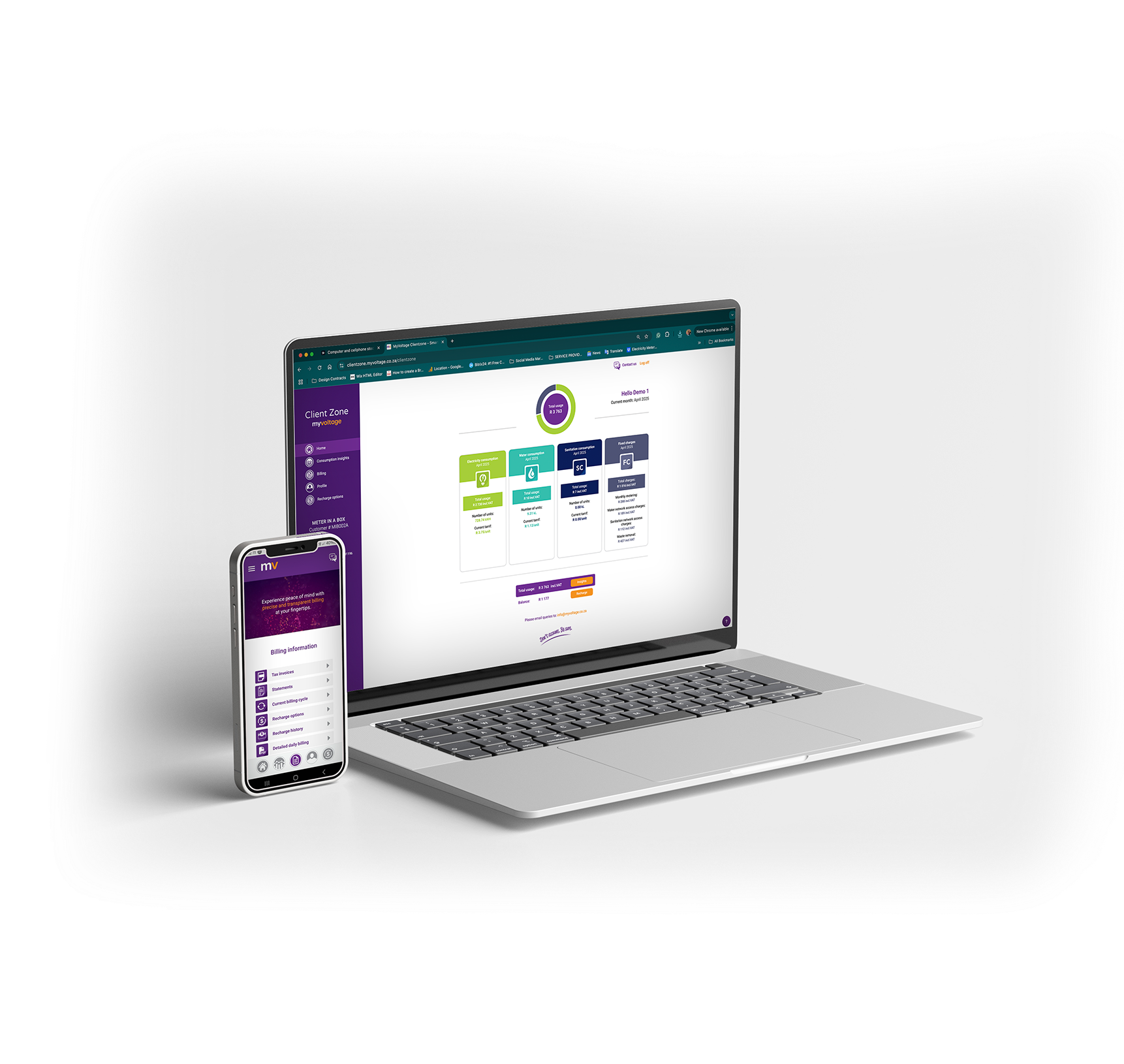
You can access the Client Zone through the MyVoltage App or online. This smart, cloud-based platform gives you live access to your account balance, detailed billing, and real-time consumption insights. You can also recharge your Wallet quickly and securely. For a more detailed breakdown of your usage, billing history, or payments made, log in to the website for full reporting.Access to the Client Zone:
Payment methods
MyVoltage is a pay-as-you-go service, you only pay for what you use, giving you full control with no surprise bills. With simple payment options, it’s easy to keep your Wallet loaded and your smart utility metering seamless.
Important Reminder:
1. Convenience fees are not charged by MyVoltage, but by the merchant providing the payment service.
2. Your current utility tariff structure remains unchanged.
| 1. Netcash Ozow |
|---|
| User rating 5/5 - preferred choice |
| 0% Convenience fee |
| Secure payment method |
| Reflects immediately |
| Immediate reconnection as soon as payment is made |
| Available on the Client Zone |
| Ozow applies PCI DSS and SSL security standards to its automated EFT platform. Ozow does not store any information that can be used to access your bank account. Ozow uses the highest encryption standard available, in addition to your Bank multi-factor (MFA) security mechanisms. |
| 2. Netcash card payment |
|---|
| User rating 4/5 |
| 10% Convenience fee |
| Secure Payment method |
| Reflects immediately |
| Immediate reconnection as soon as payment is made |
| Available on the Client Zone |
| 3. Unipin voucher |
|---|
| User rating 3/5 |
| 10% Convenience fee |
| Secure payment method |
| Reflects immediately |
| Immediate reconnection as soon as payment is made |
| Available on the Client Zone |
| UniPin vouchers are available at retailers like Shoprite, Checkers, Spar, and Engen/Shell garages. You can pay with cash or card. For quicker purchases, save your meter number on your phone for easy reference. |
| 4. Traditional EFT |
|---|
| User rating 1/5 |
| 0% Convenience fee |
| Secure payment method |
| Can take up to 3 business days to reflect on your Wallet |
| Reconnection can take up to 3 business days. Even if “instant payment” is selected, the bank will reverse it. |
| Available on the Client Zone |
| On the Recharge page, select “Capitec Business” and include your unique Reference Number as indicated on the EFT popup to ensure your payment is correctly allocated to your Wallet. |
FAQ's
Got questions about your tariffs, billing, or costs? We’ve compiled answers to the most common queries to help you understand how your charges work, why they may change, and what each fee means. From fixed charges and convenience fees to disputing a meter reading, you’ll find all the details here.
Final invoicing
From 1 September 2026 billing to be on MyVoltage platform
.
Online introduction and demos
Please join us for the following online meetings to learn more about the transition, ask questions, and get comfortable with your new system.
Pre-onboarding introduction
Join us for an online introduction session where we’ll walk you through the metering takeover, show you how to navigate your Onboarding Hub, and explain why joining the WhatsApp Onboarding Channel is essential for receiving your meter number.Join our online introduction sessions:
Time: 18:00 - 19:00
Client Zone demo
Discover how easy it is to manage your utilities with MyVoltage! In this live Client Zone demo, we’ll show you how to register, check your balance, track your usage, and recharge your Wallet. You’ll also have the chance to ask questions during a Q&A session to make sure you feel confident navigating the platform.Join our online demo and Q&A:
Time: 18:00 - 19:00
Join our Facebook and LinkedIn page
Join our Facebook page to stay in the loop with helpful tips, important updates, and exciting competitions where you can win credit towards your MyVoltage Client Zone Wallet. It’s the easiest way to stay informed, save money, and enjoy a little extra fun along the way. Tap in and be part of the community!
Contact us
Office Hours: 087 057 2561
After Hours: 079 492 503616:30 to 21:00 on weekdays
08:00 to 21:00 on weekends and public holidays[email protected]